CC Alumni Record SmartSchool v8.2.1
8.2.1

SmartSchool CC Alumni Directory: Build an alumni network and achieve the value of life
Downcodes editor
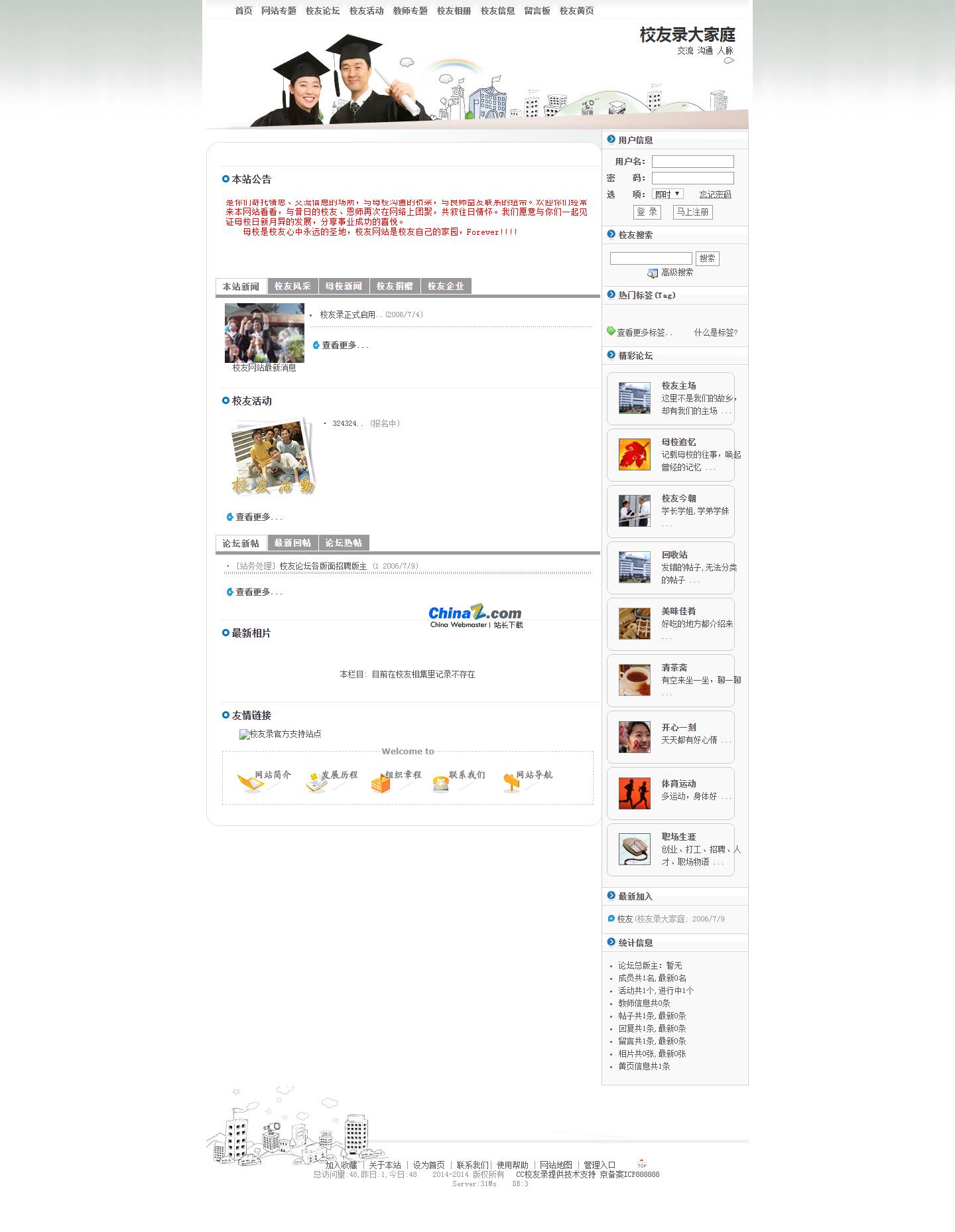
SmartSchool CC Alumni Directory is a communication platform specially created for alumni groups who work in a certain city after graduation. It aims to build a vibrant interactive community for alumni, and based on this, it helps alumni accumulate connections and achieve life value. .
Features
CC Alumni Record V8 (Graduation Edition) stands out for its efficiency, security, and comprehensive functions, providing an ideal communication platform for alumni.
1. Powerful background management functions
CC Alumni Directory V8 is built using ASP and Access or SQLServer database. With years of accumulated web development and database experience, it has achieved powerful backend management functions.
Personalized website template definition: Administrators can freely customize website templates as needed to create a unique alumni website.
Flexible permission settings: The website can be divided into nine functional modules such as alumni information, forums, message boards, yellow pages, teacher topics, website topics, photo albums, activities, and personal homepages. Administrators can set access permissions for different functional modules according to their own needs. , such as opening to all visitors, opening to all registered members, opening or closing functions to VIP members, thereby effectively controlling the operational characteristics and needs of the alumni website.
Convenient website management: Administrators can easily manage the entire alumni website, including adding, modifying, deleting website content, and maintaining website information.
2. Rich and diverse alumni interaction functions
CC Alumni Directory V8 provides a variety of interactive functions to create a good communication experience for alumni.
Personalized personal space: Each alumni has an exclusive personal homepage (blog) where they can publish posts, photos, participate in activities, leave messages, collect, etc. to show their personal style and create a personalized online space.
Alumni Yellow Pages: Alumni can publish information on supply and demand, commodities, recruitment, enterprises, investment, cooperation, etc., find relevant resources conveniently and quickly, and realize information sharing and resource docking.
Teacher topic: Provide a platform for alumni to enter and browse teacher information and express their gratitude and respect for teachers.
Website special topics: To meet the different needs of alumni records, administrators can create special columns with various themes and publish relevant information, such as information on the establishment of alumni organizations, gathering information, alumni exchange information, etc.
Alumni activities: Provide an activity-based alumni social network platform to help alumni organize and participate in various alumni gatherings, fellowships, exhibitions, sports activities, etc., to enhance mutual feelings and expand contacts.
Photo album: Provides rich photo uploading, pasting, commenting, and collection functions to facilitate alumni to share their own image world, and highlight specific themes through the photo album function to resonate with alumni.
Alumni data download: Provides the function of exporting and downloading alumni data, which is convenient for alumni to view alumni information at any time and anywhere, and to facilitate the organization of alumni activities, fund-raising and other activities.
Alumni information cloud map: Provides an intuitive cloud map of alumni industry, graduation and enrollment year distribution, making it easier for alumni to understand the distribution of alumni groups and establish broader connections.
3. Safe and reliable user information management
CC Alumni V8 attaches great importance to the security of user information and provides strict three-level confidentiality user information settings to protect the personal privacy of alumni.
Registration: Alumni registration requires filling in personal information, including name, graduation year, major, workplace, contact information, etc. The information can be set to public, visible only to friends, or visible only to myself to protect personal privacy.
Data maintenance: Alumni can modify their personal data and update their personal information at any time.
Find/Search: Provides a powerful search function, which can easily and quickly find alumni information, and can also be filtered based on multiple conditions to meet different query needs.
4. Full technical support and after-sales service
CC Alumni V8 adheres to the concept that software is both a service and provides full technical support and after-sales service to provide alumni with support and help in use.
Technical support: Provide online technical support to solve problems encountered by users during use.
After-sales service: Provide continuous after-sales service to ensure the stable operation and perfect functions of the alumni registration system.
System requirements
Hardware environment: MS WINDOWS NT PACK 4 OR LATER /WIN2000 WITH IIS 4.0, MS WINDOWS 9X+PWS
Database: MS Access2000
Recommended environment: Windows 2000+IIS5.0+Access2000+IE5.5
System installation
1. Upload files: Upload all files to your server space.
2. Run index.asp: Run the index.asp file in the directory. The first installation will automatically establish the running environment of the alumni directory. The database files are located in the db directory.
3. Set the image address: Use a text editor to open the incuserconfig.asp file in the inc directory and find the parameter GBLstrUploadDir. This parameter must start with a slash. If your website is directly in the root directory, there is no need to modify it. Keep it as Dim GBLstrUploadDir: GBLstrUploadDir = "/upload/"; if it is in the xxx directory, it should be set to Dim GBLstrUploadDir: GBL_strUploadDir = "/xxx/upload/".
4. Backend management: The backend management system is a separate system. There is a management entrance link at the bottom of the homepage, from which you can enter the management panel. The default administrator account is: admin, password: 111111. Please change the password immediately after first use.
5. Permission settings: In order to ensure the normal use of functions such as image upload, please keep the upload folder readable and writable.
6. Built-in user: There is currently a built-in alumni registration user: school, with a password of 111111, which can be modified by yourself.
Summarize
SmartSchool CC Alumni Directory V8 (Graduation Edition) is a powerful, safe and reliable alumni directory solution. It not only helps alumni build a vibrant interactive community, but also provides alumni with comprehensive information resources and personal connections. The network helps alumni continue to advance on the road of life and achieve the value of life.