xNode
1.8.0


Downloads / Asset Store / Dokumentation
Unterstützen Sie Xnode auf Ko-Fi oder Patreon
Für die volle ODIN -Unterstützung sollten Sie die Gabel von Kajed82 verwenden
Denken Sie daran, ein knotenbasiertes Plugin zu entwickeln? Dann ist das für dich. Sie können es als Archiv herunterladen und ein neues Einheitsprojekt auspacken oder als Git -Submodule verbinden.
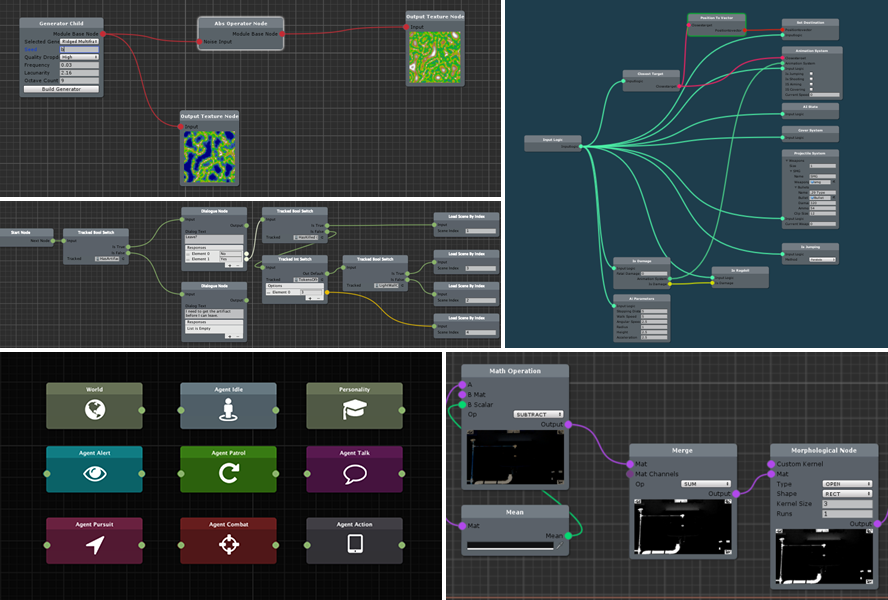
Xnode ist super benutzerfreundlich, intuitiv und hilft Ihnen, die Vorteile von Knotengrafiken in kürzester Zeit zu nutzen. Mit einem minimalen Fußabdruck ist es ideal als Basis für benutzerdefinierte Staatsmaschinen, Dialogsysteme, Entscheidungsträger usw.
Über Git -URL (erfordert Unity Version 2018.3.0b7 oder höher)
Um dieses Projekt als GIT -Abhängigkeit mit dem Unity -Paket -Manager zu installieren, fügen Sie die folgende Zeile zum manifest.json Ihres Projekts hinzu:
"com.github.siccity.xnode": "https://github.com/siccity/xNode.git"
Sie müssen Git auf dem Weg Ihres Systems installieren und verfügbar lassen.
Wenn Sie Assembly -Definitionen in Ihrem Projekt verwenden, müssen Sie XNode und/oder XNodeEditor als Assembly -Definitionsreferenzen hinzufügen.
Via openupm
Das Paket ist in der OpenUPM -Registrierung erhältlich. Es wird empfohlen, es über OpenUpm-Cli zu installieren.
openupm add com.github.siccity.xnode
Über Git -Submodul
Um Xnode als Submodule in Ihr vorhandenes Git -Projekt hinzuzufügen, führen Sie den folgenden Git -Befehl aus Ihrem Projektroot aus:
git submodule add [email protected]:Siccity/xNode.git Assets/Submodules/xNode
Wenn Ihnen kein Quellangestellten oder Paketmanager verfügbar ist, können Sie die Quelldateien einfach in Ihren Assets -Ordner kopieren/einfügen.
 // public classes deriving from Node are registered as nodes for use within a graph
public class MathNode : Node {
    // Adding [Input] or [Output] is all you need to do to register a field as a valid port on your node
    [ Input ] public float a ;
    [ Input ] public float b ;
    // The value of an output node field is not used for anything, but could be used for caching output results
    [ Output ] public float result ;
    [ Output ] public float sum ;

    // The value of 'mathType' will be displayed on the node in an editable format, similar to the inspector
    public MathType mathType = MathType . Add ;
    public enum MathType { Add , Subtract , Multiply , Divide }

    // GetValue should be overridden to return a value for any specified output port
    public override object GetValue ( NodePort port ) {

        // Get new a and b values from input connections. Fallback to field values if input is not connected
        float a = GetInputValue < float > ( "a" , this . a ) ;
        float b = GetInputValue < float > ( "b" , this . b ) ;

        // After you've gotten your input values, you can perform your calculations and return a value
        if ( port . fieldName == "result" )
            switch ( mathType ) {
                case MathType . Add : default : return a + b ;
                case MathType . Subtract : return a - b ;
                case MathType . Multiply : return a * b ;
                case MathType . Divide : return a / b ;
            }
        else if ( port . fieldName == "sum" ) return a + b ;
        else return 0f ;
    }
}
Plugins sind Repositorys, die XNode Funktionalität hinzufügen
Schließen Sie sich dem Discord -Server bei, um Feedback zu hinterlassen oder Unterstützung zu erhalten. Fühlen Sie sich frei, auch Vorschläge/Anfragen auf der Seite der Probleme zu hinterlassen.






