clip guided diffusion
Portrait

من crowsonkb.
إخلاء المسئولية: أقوم بإعادة توجيه الجهود إلى Pyglide وقد أكون بطيئًا في معالجة الأخطاء هنا.
أوصي أيضًا بالنظر إلى @crowsonkb's v-diffusion-pytorch.
انظر التسميات التوضيحية والمزيد من الأجيال في المعرض.
git clone https://github.com/afiaka87/clip-guided-diffusion.git
cd clip-guided-diffusion
git clone https://github.com/crowsonkb/guided-diffusion.git
pip3 install -e guided-diffusion
python3 setup.py install cgd -txt "Alien friend by Odilon Redo"
سيتم حفظ GIF من التشغيل الكامل إلى ./outputs/caption_{j}.gif }.
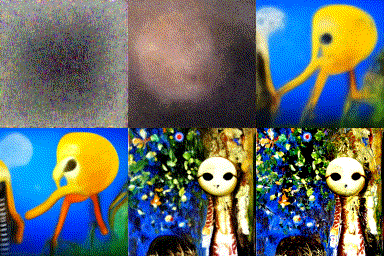
./outputs سوف تحتوي على جميع المخرجات الوسيطةcurrent.png على الجيل الحالي.--wandb_project <project_name> لتمكين تسجيل المخرجات الوسيطة إلى WANDB. يتطلب حساب مجاني. سيتم توفير عنوان URL للتشغيل في CLI - مثال Run~/.cache/clip-guided-diffusion/ سيحتوي على نقاط تفتيش تم تنزيلها من Openai/Katherine Crowson. --prompts / -txts --image_size / -size
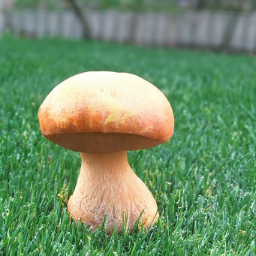
cgd --image_size 256 --prompts "32K HUHD Mushroom"
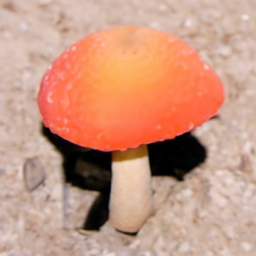
| شخصية.: حرف.cgd --prompts "Noun to visualize:1.0|style:0.1|location:0.1|something you dont want:-0.1" cgd -txt "32K HUHD Mushroom|Green grass:-0.1"
cgd --device cpu --prompt "Some text to be generated"
cgd --prompt "Theres no need to specify a device, it will be chosen automatically"
--timestep_respacing أو -respace (الافتراضي: 1000 )
25 ، 50 ، 150 ، 250 ، 500 ، 1000 ، ddim25 ، ddim50 ، ddim150 ، ddim250 ، ddim500 ، ddim10001000 )ddim سيستخدم جدولة DDIM. على سبيل المثال ، سوف يستخدم ddim25 25 Timstep DDIM Scheduler. قد تكون هذه الطريقة أفضل في قيم TimesteP_Resping أقصر.--init_image / -init--skip_timesteps / -skip عدد الأوقات الزمنية لإنفاق مزج الصورة مع عينات الانتشار الموجهة. يجب أن تكون أقل من --timestep_respacing ومت أكبر من 0. القيم الجيدة باستخدام توقيت 1000 تتراوح من 250 إلى 500.
-respace 1000 -skip 500-respace 500 -skip 250-respace 250 -skip 125-respace 125 -skip 75--init_scale / -is لتمكين خسارة إدراكية VGG بعد المزج ، يجب عليك تحديد قيمة --init_scale . 1000 يبدو أن يعمل بشكل جيد.
cgd --prompts " A mushroom in the style of Vincent Van Gogh "
  --timestep_respacing 1000
  --init_image " images/32K_HUHD_Mushroom.png "
  --init_scale 1000
  --skip_timesteps 350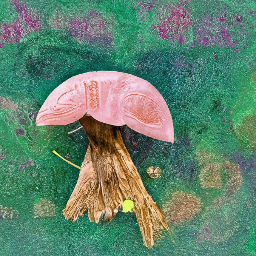
64, 128, 256, 512 pixels (square)--clip_guidance_scale و --tv_scale . أوصي بالبدء بـ -cgs 5 -tvs 0.00001 والتجربة من هناك. --clip_guidance_scale و-- --tv_scale سوف يتطلبون تجريبًا.cgd --init_image=images/32K_HUHD_Mushroom.png
--skip_timesteps=500
--image_size 64
--prompt " 8K HUHD Mushroom "  تغيير حجمه إلى 200 بكسل للرؤية
cgd --image_size 512 --prompt " 8K HUHD Mushroom " 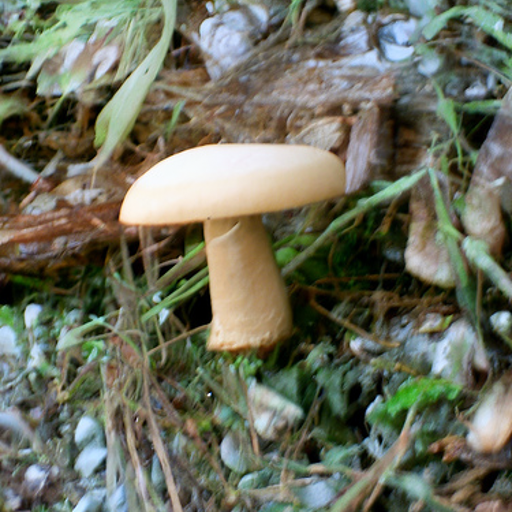
جديد: الأجيال غير المربعة (التجريبية) إنشاء صور أو منظر طبيعي عن طريق تحديد رقم لتعويض العرض و/أو الارتفاع.
my_caption= " a photo of beautiful green hills and a sunset, taken with a blackberry in 2004 "
cgd --prompts " $my_caption "
    --image_size 128
--width_offset 32 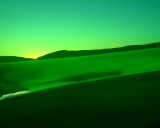
 # Initialize diffusion generator
from cgd import clip_guided_diffusion
import cgd_util

cgd_generator = clip_guided_diffusion (
    prompts = [ "an image of a fox in a forest" ],
    image_prompts = [ "image_to_compare_with_clip.png" ],
    batch_size = 1 ,
    clip_guidance_scale = 1500 ,
    sat_scale = 0 ,
    tv_scale = 150 ,
    init_scale = 1000 ,
    range_scale = 50 ,
    image_size = 256 ,
    class_cond = False ,
    randomize_class = False , # only works with class conditioned checkpoints
    cutout_power = 1.0 ,
    num_cutouts = 16 ,
    timestep_respacing = "1000" ,
    seed = 0 ,
    diffusion_steps = 1000 , # dont change this
    skip_timesteps = 400 ,
    init_image = "image_to_blend_and_compare_with_vgg.png" ,
    clip_model_name = "ViT-B/16" ,
    dropout = 0.0 ,
    device = "cuda" ,
    prefix_path = "store_images/" ,
    wandb_project = None ,
    wandb_entity = None ,
    progress = True ,
)
prefix_path . mkdir ( exist_ok = True )
list ( enumerate ( tqdm ( cgd_generator ))) # iterate over generator usage: cgd [-h] [--prompts PROMPTS] [--image_prompts IMAGE_PROMPTS]
[--image_size IMAGE_SIZE] [--init_image INIT_IMAGE]
[--init_scale INIT_SCALE] [--skip_timesteps SKIP_TIMESTEPS]
[--prefix PREFIX] [--checkpoints_dir CHECKPOINTS_DIR]
[--batch_size BATCH_SIZE]
[--clip_guidance_scale CLIP_GUIDANCE_SCALE] [--tv_scale TV_SCALE]
[--range_scale RANGE_SCALE] [--sat_scale SAT_SCALE] [--seed SEED]
[--save_frequency SAVE_FREQUENCY]
[--diffusion_steps DIFFUSION_STEPS]
[--timestep_respacing TIMESTEP_RESPACING]
[--num_cutouts NUM_CUTOUTS] [--cutout_power CUTOUT_POWER]
[--clip_model CLIP_MODEL] [--uncond]
[--noise_schedule NOISE_SCHEDULE] [--dropout DROPOUT]
[--device DEVICE] [--wandb_project WANDB_PROJECT]
[--wandb_entity WANDB_ENTITY] [--height_offset HEIGHT_OFFSET]
[--width_offset WIDTH_OFFSET] [--use_augs] [--use_magnitude]
[--quiet]
optional arguments:
-h, --help show this help message and exit
--prompts PROMPTS, -txts PROMPTS
the prompt/s to reward paired with weights. e.g. ' My
text:0.5|Other text:-0.5 ' (default: )
--image_prompts IMAGE_PROMPTS, -imgs IMAGE_PROMPTS
the image prompt/s to reward paired with weights. e.g.
' img1.png:0.5,img2.png:-0.5 ' (default: )
--image_size IMAGE_SIZE, -size IMAGE_SIZE
Diffusion image size. Must be one of [64, 128, 256,
512]. (default: 128)
--init_image INIT_IMAGE, -init INIT_IMAGE
Blend an image with diffusion for n steps (default: )
--init_scale INIT_SCALE, -is INIT_SCALE
(optional) Perceptual loss scale for init image.
(default: 0)
--skip_timesteps SKIP_TIMESTEPS, -skip SKIP_TIMESTEPS
Number of timesteps to blend image for. CLIP guidance
occurs after this. (default: 0)
--prefix PREFIX, -dir PREFIX
output directory (default: outputs)
--checkpoints_dir CHECKPOINTS_DIR, -ckpts CHECKPOINTS_DIR
Path subdirectory containing checkpoints. (default:
/home/samsepiol/.cache/clip-guided-diffusion)
--batch_size BATCH_SIZE, -bs BATCH_SIZE
the batch size (default: 1)
--clip_guidance_scale CLIP_GUIDANCE_SCALE, -cgs CLIP_GUIDANCE_SCALE
Scale for CLIP spherical distance loss. Values will
need tinkering for different settings. (default: 1000)
--tv_scale TV_SCALE, -tvs TV_SCALE
Controls the smoothness of the final output. (default:
150.0)
--range_scale RANGE_SCALE, -rs RANGE_SCALE
Controls how far out of RGB range values may get.
(default: 50.0)
--sat_scale SAT_SCALE, -sats SAT_SCALE
Controls how much saturation is allowed. Used for
ddim. From @nshepperd. (default: 0.0)
--seed SEED, -seed SEED
Random number seed (default: 0)
--save_frequency SAVE_FREQUENCY, -freq SAVE_FREQUENCY
Save frequency (default: 1)
--diffusion_steps DIFFUSION_STEPS, -steps DIFFUSION_STEPS
Diffusion steps (default: 1000)
--timestep_respacing TIMESTEP_RESPACING, -respace TIMESTEP_RESPACING
Timestep respacing (default: 1000)
--num_cutouts NUM_CUTOUTS, -cutn NUM_CUTOUTS
Number of randomly cut patches to distort from
diffusion. (default: 16)
--cutout_power CUTOUT_POWER, -cutpow CUTOUT_POWER
Cutout size power (default: 1.0)
--clip_model CLIP_MODEL, -clip CLIP_MODEL
clip model name. Should be one of: ( ' ViT-B/16 ' ,
' ViT-B/32 ' , ' RN50 ' , ' RN101 ' , ' RN50x4 ' , ' RN50x16 ' ) or a
checkpoint filename ending in ` .pt ` (default:
ViT-B/32)
--uncond, -uncond Use finetuned unconditional checkpoints from OpenAI
(256px) and Katherine Crowson (512px) (default: False)
--noise_schedule NOISE_SCHEDULE, -sched NOISE_SCHEDULE
Specify noise schedule. Either ' linear ' or ' cosine ' .
(default: linear)
--dropout DROPOUT, -drop DROPOUT
Amount of dropout to apply. (default: 0.0)
--device DEVICE, -dev DEVICE
Device to use. Either cpu or cuda. (default: )
--wandb_project WANDB_PROJECT, -proj WANDB_PROJECT
Name W & B will use when saving results. e.g.
` --wandb_project " my_project " ` (default: None)
--wandb_entity WANDB_ENTITY, -ent WANDB_ENTITY
(optional) Name of W & B team/entity to log to.
(default: None)
--height_offset HEIGHT_OFFSET, -ht HEIGHT_OFFSET
Height offset for image (default: 0)
--width_offset WIDTH_OFFSET, -wd WIDTH_OFFSET
Width offset for image (default: 0)
--use_augs, -augs Uses augmentations from the ` quick ` clip guided
diffusion notebook (default: False)
--use_magnitude, -mag
Uses magnitude of the gradient (default: False)
--quiet, -q Suppress output. (default: False)
git clone https://github.com/afiaka87/clip-guided-diffusion.git
cd clip-guided-diffusion
git clone https://github.com/afiaka87/guided-diffusion.git
python3 -m venv cgd_venv
source cgd_venv/bin/activate
pip install -r requirements.txt
pip install -e guided-diffusionpython -m unittest discover




