
金铲铲单机版进不去怎么办
- 作者:互联网
- 时间:2024-05-14 15:08:01
这里为大家带来金铲铲单机版进不去怎么办,这是最近很多小伙伴都在玩的游戏,这也是很多玩家都遇到的问题,还不会的朋友快一起来看看详细的攻略吧。

金铲铲单机版进不去怎么办
点击下载:https://www.l*in*kch*ic.com/app/299094.html
1、首先我们打开游戏后,在这个界面当中直接把网络给关闭。


2、然后我们等待网络关闭5-10秒的时间再打开网络。

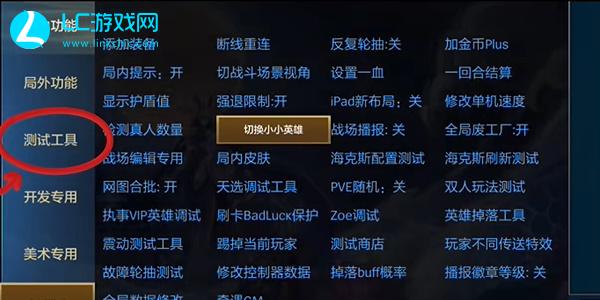
3、之后我们在该页面点击下方一串代码,在左侧列表点击【测试工具】。

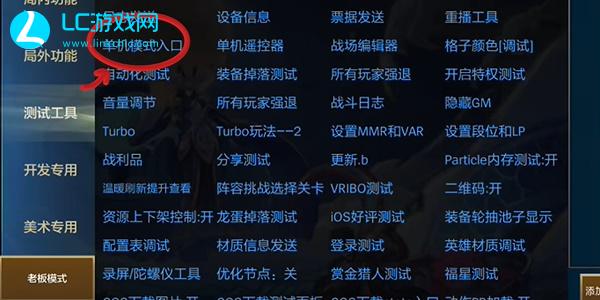
4、随后我们右侧的界面在第二排第一个找到【单机模式入口】。
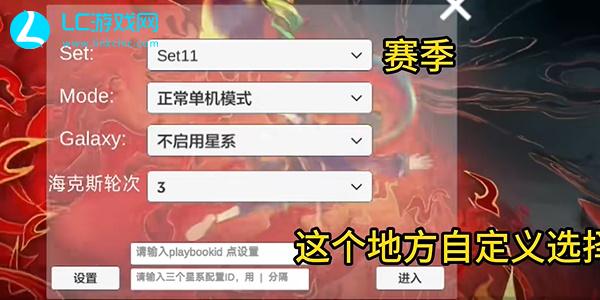
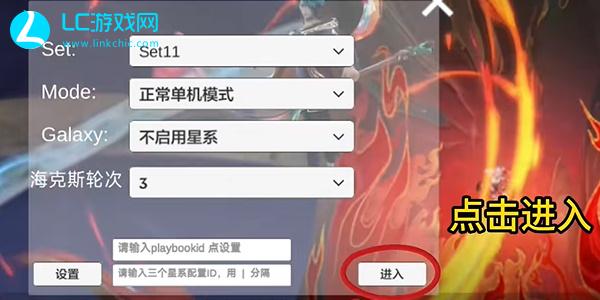
5、我们可以直接点击【set11】赛季,可以根据自己的想法来选择,右下角直接点击进入。
6、随后左侧点击选择【局内功能】,在右边找到第五排第三个海克斯【新增海克斯代码】。

7、最后我们把正确的海克斯代码添加进去,即可来到该游戏页面。

上一篇: 光遇5.14肉桂卷代币在哪里
下一篇: 崩坏星穹铁道美梦小镇的魔术师成就怎么获取
相关阅读
- 金铲铲战神诺手阵容怎么玩 2026-01-13
- 金铲铲JOC公开赛奖金分配 2025-09-21
- 金铲铲s15洛技能是什么 2025-09-12
- 金铲铲s15卡莉斯塔技能是什么 2025-09-11
- 金铲铲s15赵信技能是什么 2025-09-07
- 金铲铲s15卡尔玛技能是什么 2025-09-07